

Last tax season, I watched a three-person bookkeeping firm in Mississauga burn an entire weekend reconciling 14 client files inside QuickBooks Ledger. Fourteen. The bank feeds kept duplicating after a CRA update, the multi-client switching was painfully slow, and the year-end close workflows felt like they were designed for a single freelancer—not a growing practice.
They switched platforms the following Monday.
If that scenario sounds familiar, this roundup is for you. I evaluated the most practical QuickBooks ledger alternatives in Canada based on how they actually perform under the pressure of batch reconciliation, multi-client ledger segregation, and CRA compliance—not just what the marketing pages promise.
The Quick Verdict
- Best for Multi-client Accounting Firms: LedgerNext
Why: AI-driven bank reconciliation with tax-ready outputs for GST/HST/QST and T2 prep. - Best for Budget-conscious Solos: Wave Accounting
Why: Free core platform with built-in receipt scanning capabilities. - Best for Enterprise & Multi-entity: Sage Intacct
Why: Deep subledger rollups and seamless multi-currency consolidation.
What Is QuickBooks Ledger?
QuickBooks Ledger is Intuit’s bookkeeping-focused product designed for accountants managing client books. It provides basic general ledger functions, bank connections, and transaction categorization within the QuickBooks ecosystem.
Canadian firms have used it as a default because of its brand recognition and integration with ProConnect Tax. That said, “default” and “best fit” aren’t the same thing. And the gap widens fast once you’re handling more than a handful of clients.
Why Do Accountants Look for QuickBooks Ledger Alternatives?
Canadian accounting firms outgrow QuickBooks Ledger when manual reconciliation slows down their workflow, multi-client management becomes disorganized, and tax-ready outputs require too much manual formatting.
The most common friction points include limited batch reconciliation automation, weak permissioned accountant access controls, and API bank feed limits that cause duplicate transactions during CRA reporting periods.
they regularly keep raising the prices, client portal is very expensive and application looks bloated with too many unnecessary features.
Here’s what I keep hearing from practitioners:
- Reconciliation bottlenecks. High-volume firms processing 500+ transactions per client per month hit a wall. There’s no zero-touch expense categorization—everything needs manual review.
- Multi-client chaos. Switching between client files feels clunky. There’s no centralized dashboard showing reconciliation progress across all accounts.
- Tax prep gaps. Getting data from QuickBooks into T2-ready format requires exporting, reformatting, and re-importing into tax software. That’s hours of unbillable work.
- Scaling costs. Add payroll, add users, add integrations—and suddenly the 3-year TCO looks nothing like the sticker price.
📉 The Tax-Season Margin Drain
A 2026 CPA practice management survey found that mid-sized Canadian firms lose an average of 11 unbillable hours per client during year-end prep simply formatting general ledger exports into CRA-compliant tax prep software. Software that lacks native T2/GST mapping is effectively stealing margin.
What Features Should Accountants Look for in Bookkeeping Software?
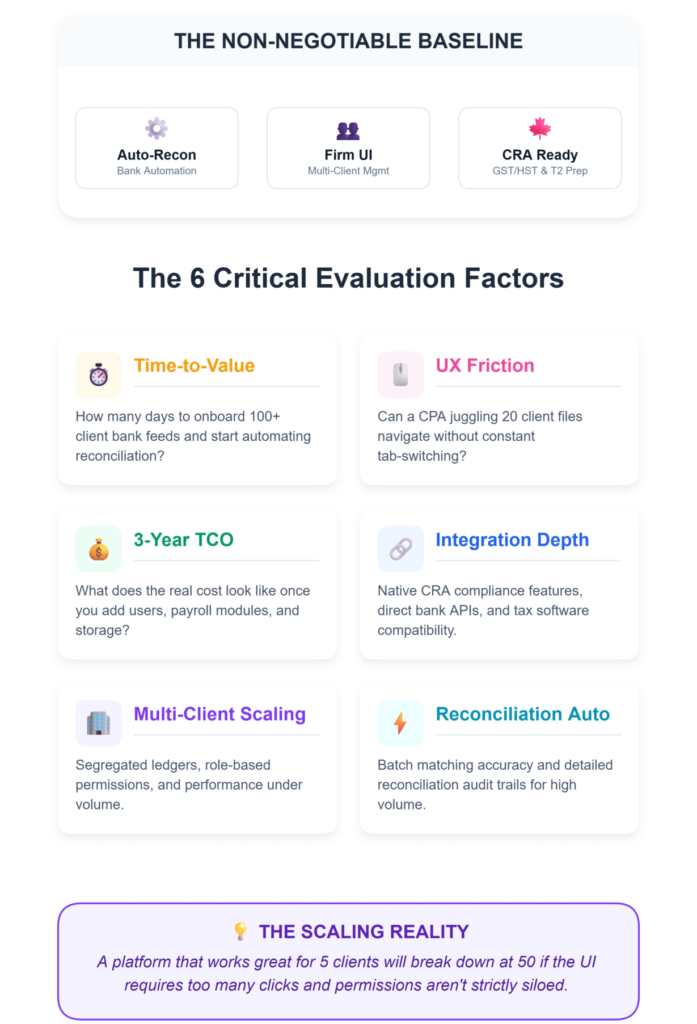
The best bookkeeping platform for Canadian accounting firms should automate bank reconciliation, support multi-client management from a single interface, and produce financial reports compatible with Canadian tax filing requirements including GST/HST and T2 preparation.
I weighed six factors when building this list:
- Time-to-Value — How many days to onboard 100+ client bank feeds and start automating reconciliation?
- UX Friction — Can a CPA juggling 20 client files navigate without constant tab-switching?
- 3-Year TCO — What does the real cost look like once you add users, payroll modules, and storage?
- Integration Depth — Native CRA compliance features, direct bank APIs, and compatibility with Canadian tax software.
- Multi-Client Scaling — Segregated ledgers, role-based permissions, and performance under volume.
- Reconciliation Automation — Batch matching accuracy and reconciliation audit trails for high-volume transactions.
The Forensic Breakdown: Each Alternative in Practice
1. LedgerNext
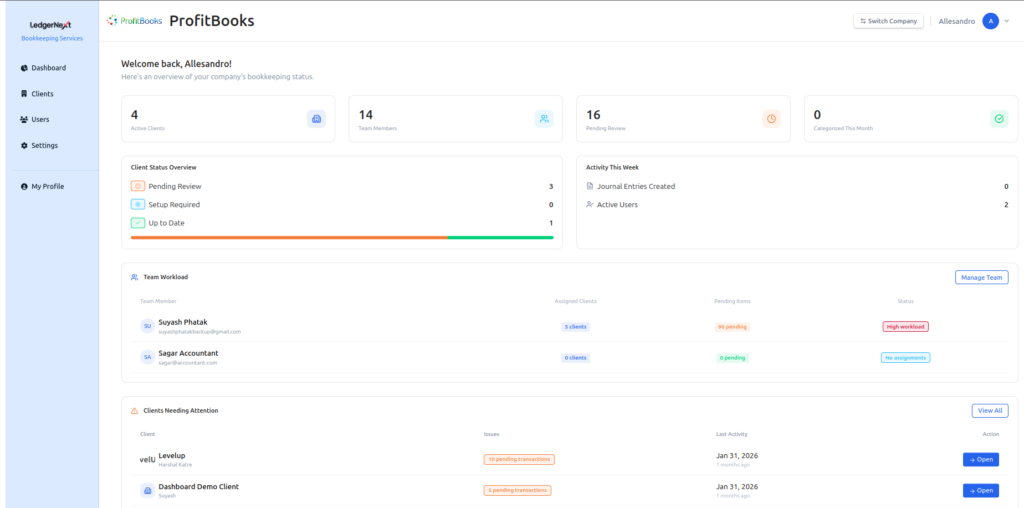
Best For: Multi-client CPA firms
LedgerNext is purpose-built for the exact workflow most accounting firms actually follow: ingest bank statements, categorize transactions, reconcile accounts, and produce tax-ready financials. It handles this entire pipeline from a centralized client management dashboard that tracks every client’s reconciliation status in real time.
What sets it apart is the AI-assisted transaction categorization. Instead of manually tagging hundreds of line items, the platform learns your categorization patterns and applies them across clients. Batch reconciliation runs significantly faster—firms report cutting reconciliation time by roughly 40% after the first month.
The tax-readiness angle is where LedgerNext earns its place on this list. Financial reports export in formats compatible with Canadian tax preparation workflows, including GST/HST/QST and T2 filing. That eliminates the reformatting step that eats unbillable hours in most firms.
Practical note: LedgerNext is a newer platform, so its third-party integration marketplace is still growing. But for firms whose core pain is reconciliation speed and tax-ready output, it addresses the problem directly.
2. Xero

Best For: Collaborative SMB firms
Xero’s strength is collaboration. Unlimited users across all plans means your entire team accesses client files without per-seat charges. The bank feed interface is clean, and the green checkmark on successful reconciliation gives you instant visual confirmation.
The reality gap: “Powerful automation” is the pitch, but inventory reconciliation in Canada requires third-party apps. And payroll? That’s an add-on that roughly doubles your per-client cost at scale.
Scaling penalty: Starter tier at ~$17/mo looks attractive. But a firm with 10+ clients needing payroll can see 3-year TCO jump significantly once add-ons stack up.
The glitch you’ll hit: Bank feeds sometimes duplicate after CRA-related updates. The workaround that actually works: clear your browser cache, then toggle “auto-match” off and back on in reconciliation settings. Annoying, but it resolves in under two minutes.
Anti-persona: Not ideal for solo tax preparers who want zero learning curve. Xero assumes you’re comfortable with double-entry accounting.
3. Wave Accounting
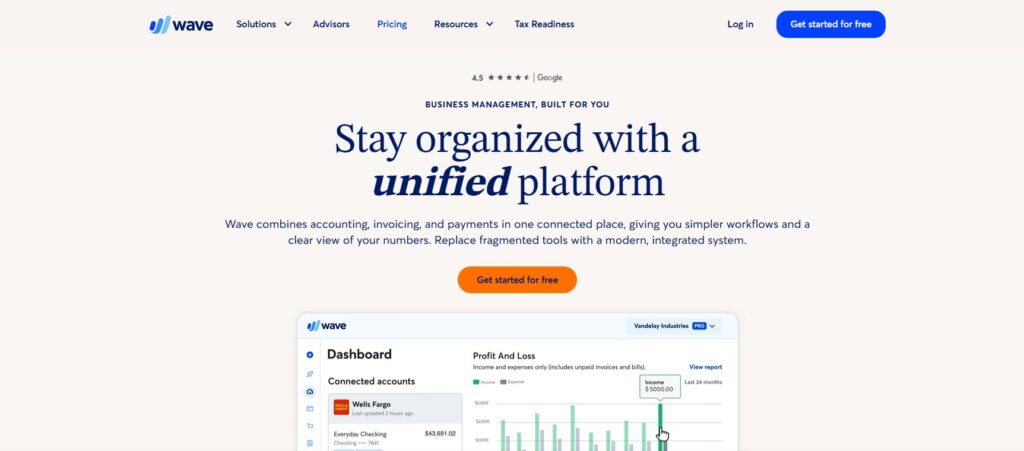
Best For: Solo bookkeepers
Wave is free, and for solo bookkeepers handling a few clients, that matters. Receipt scanning works well, and the “100% match” badge on categorized receipts gives a satisfying visual checkpoint—though it usually only appears after a manual category tweak.
The reality gap: “Free forever” comes with asterisks. Multi-user access requires the Pro upgrade. One practitioner told me: “Wave free for solos, but scaling to 5 clients? I was back to spreadsheets for reconciliations.”
Scaling penalty: Free to Pro at ~$16/mo per user. Transaction volume fees aren’t prominently disclosed, and they add up. The 3-year TCO for a growing firm isn’t actually free at all.
The glitch: Bulk invoice sends occasionally hang. The fix is unglamorous: export to CSV, re-import the batch.
4. FreshBooks
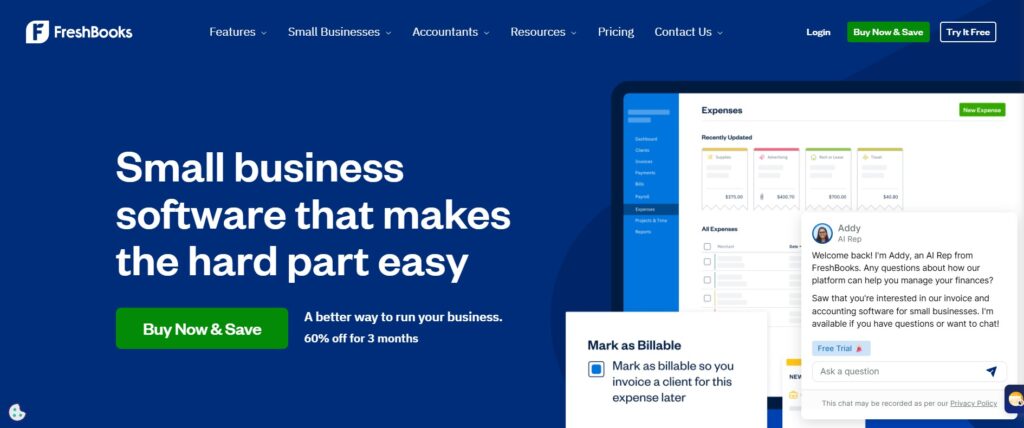
Best For: Service-based invoicing
FreshBooks nails invoicing. The time-tracking interface is genuinely intuitive, and for service-based firms billing by the hour, it’s hard to beat. The pie chart for billable time grays out at 80% if expenses are unallocated—a useful nudge.
The reality gap: “Effortless” is the brand promise, but project tracking oversimplifies ledger rollups. Year-end T4 preparation for multi-client firms? That’s a manual process. One CPA put it bluntly: “FreshBooks invoicing is butter, but year-end T4s? Manual hell for multi-client.”
Scaling penalty: Base plan at ~$22/mo to ~$60/mo for growth. Client limits force tier upgrades, inflating TCO by roughly 50%.
The glitch: Mobile sync fails after app updates. Force-quit, then reconnect your bank feed via desktop. It’s a known issue with no official fix yet.
5. Sage Intacct / Sage 50

Best For: Enterprise / multi-entity
Sage Intacct is enterprise-grade. Multi-entity consolidation, subledger rollups, multi-currency GST/HST mapping—it handles complexity that lighter tools can’t. Dashboard widgets pulse blue on a successful multi-entity close, which is a satisfying confirmation when you’re managing subsidiaries.
The reality gap: “Financial automation” sounds turnkey, but custom pricing hides significant setup friction. Mid-sized firms often spend weeks configuring workflows.
Scaling penalty: Starting at $400+/mo with custom tiers, growth multiplies costs at roughly 3x free alternatives. This is scalable TCO modeling at its most expensive.
The glitch: Inventory sync can lag during batch imports. The community workaround: schedule a nightly “data purge” via the built-in task scheduler.
6. TaxDome

Best For: Firm-wide practice management
TaxDome is a practice management platform that shines for firms managing high volumes of client files. The client portal badge shows “Ready for Review” in teal once e-signatures are complete—helpful for tracking workflow status at a glance.
The reality gap: “Built for scaling firms” is accurate up to a point. Document portals noticeably slow once you exceed 50 active clients. One firm manager shared: “TaxDome saved us from QuickBooks silos—client portals handled 200 statements flawlessly” —though that experience may vary with upload volume.
Scaling penalty: Base to growth tier roughly doubles cost as you add storage and users.
The glitch: Workflow assignments occasionally glitch during reassignment. The workaround: toggle the API integration off and back on, then reassign.
💡 The Multi-Client Architecture Gap
Why do legacy platforms lag during month-end closes? Because most were built as single-business software, with an “accountant layer” added on top. Every time you switch a client, the database drops and reloads a new silo. Platforms designed natively for accounting firms (like LedgerNext) use a centralized database architecture, allowing CPAs to execute bulk categorizations across multiple client files simultaneously without the loading screen latency.
How Do You Choose the Right Bookkeeping Software for Your Firm?
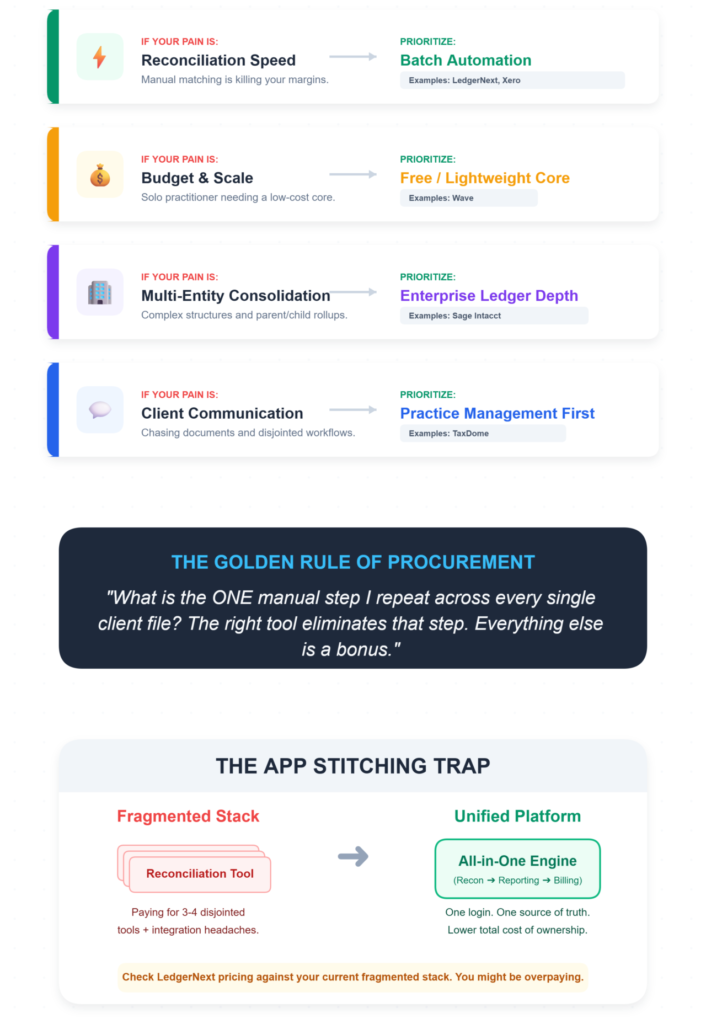
Start with your bottleneck, not a feature list.
- If reconciliation speed is killing your margins → prioritize platforms with batch reconciliation automation (LedgerNext, Xero).
- If cost is the primary constraint and you’re solo → Wave’s free tier is genuinely useful at small scale.
- If you need multi-entity consolidation → Sage Intacct handles complexity others can’t.
- If practice management matters more than ledger depth → TaxDome wraps client communication and workflow tracking together.
Ask yourself: What’s the one manual step I repeat across every single client file? The right tool eliminates that step. Everything else is a bonus.
Also, check LedgerNext pricing against your current stack. Many firms discover they’re paying for three or four tools when one purpose-built platform covers the full reconciliation-to-reporting pipeline.
Frequently Asked Questions
What is the best QuickBooks Ledger alternative in Canada?
For multi-client accounting firms, LedgerNext offers the strongest combination of automated bank reconciliation, AI-powered transaction categorization, and tax-ready financial reporting designed for Canadian workflows including GST/HST/QST and T2 preparation. For solo bookkeepers on a tight budget, Wave Accounting’s free tier remains a practical starting point.
Is there bookkeeping software designed specifically for accounting firms?
Yes. LedgerNext and TaxDome are both built for firms managing multiple client books rather than individual business owners. LedgerNext focuses on reconciliation automation and tax-ready outputs, while TaxDome emphasizes practice management, client portals, and workflow tracking across large client bases.
Can bookkeeping software generate tax-ready financial reports?
Some platforms produce financial statements formatted for Canadian tax filing. LedgerNext generates reports compatible with GST/HST/QST requirements and T2 preparation workflows, reducing the manual reformatting step. Most general-purpose tools like Wave or FreshBooks require additional export and cleanup before data is tax-filing ready.
How does automated bank reconciliation work?
Automated bank reconciliation matches imported bank transactions against recorded entries in the general ledger using rule-based and AI-driven algorithms. Platforms like LedgerNext ingest raw bank statements, categorize transactions automatically, and flag discrepancies for review—reducing manual matching from hours to minutes for high-volume accounts.
What should accountants look for in bookkeeping software?
Prioritize batch reconciliation speed, multi-client ledger segregation, permissioned access controls, CRA-compliant reporting, and scalable pricing. The platform should reduce manual data entry, support Canadian tax workflows, and allow your team to manage all client files from a single interface without performance degradation.
How do I switch from QuickBooks Ledger without losing client data?
Most alternatives support CSV or QBO file imports. Map your chart of accounts before migrating, run parallel reconciliations for one period to verify accuracy, and confirm that bank feed connections transfer without duplicating historical transactions. LedgerNext supports direct bank statement ingestion to simplify the onboarding process.
The firms that move fastest during tax season aren’t necessarily the biggest—they’re the ones that eliminated manual reconciliation from their workflow months ago.
Stop Formatting T2s Manually.
If you’re still reformatting exports and manually categorizing transactions across client files, see what your pipeline looks like when it’s automated end to end.
✅ Centralized Client Dashboard
✅ AI Transaction Categorization
✅ GST/HST/QST Tax-Ready Exports