Quick Answer: Year-end accounting software helps accountants reconcile transactions, generate financial statements, and prepare tax-ready financial data efficiently. Tools like QuickBooks Online, Sage 50, and automation-focused platforms like LedgerNext help accounting firms organize client financial records, reduce manual bookkeeping work, and speed up year-end closing workflows across multiple client books.
Key Takeaways
- Year-end accounting requires accurate bank reconciliation, financial reporting, and tax-ready data preparation.
- Accounting software helps firms process client data faster and reduce manual entry errors.
- QuickBooks Online and Sage 50 are widely used by Canadian accounting firms for year-end workflows.
- Automation-driven platforms are reducing reconciliation time by up to 50–70% compared to manual processes.
- Choosing the right tool depends on client volume, tax filing complexity, and how much manual work you’re willing to tolerate.
It was 11:47 PM on a Tuesday in January. I had 14 client files open across three browser tabs, a trial balance that refused to balance by $0.37, and a GST/HST remittance report that was pulling expenses from the wrong province. That was the year-end that broke my patience with spreadsheets—and the year I started seriously evaluating accounting software built for this exact chaos.
If you’ve spent 15+ hours per client on manual bank rec during year-end, you already know the pain. This guide walks through the three accounting software tools that actually handle the year-end accounting workflow for Canadian firms, including what breaks, what nobody tells you, and where each tool fits depending on your practice.
By the end, you’ll know exactly which platform matches your firm’s client volume, tax filing needs, and tolerance for manual work—and you’ll have a clear pre-flight checklist before your next year-end close.
What Is Year-End Accounting?
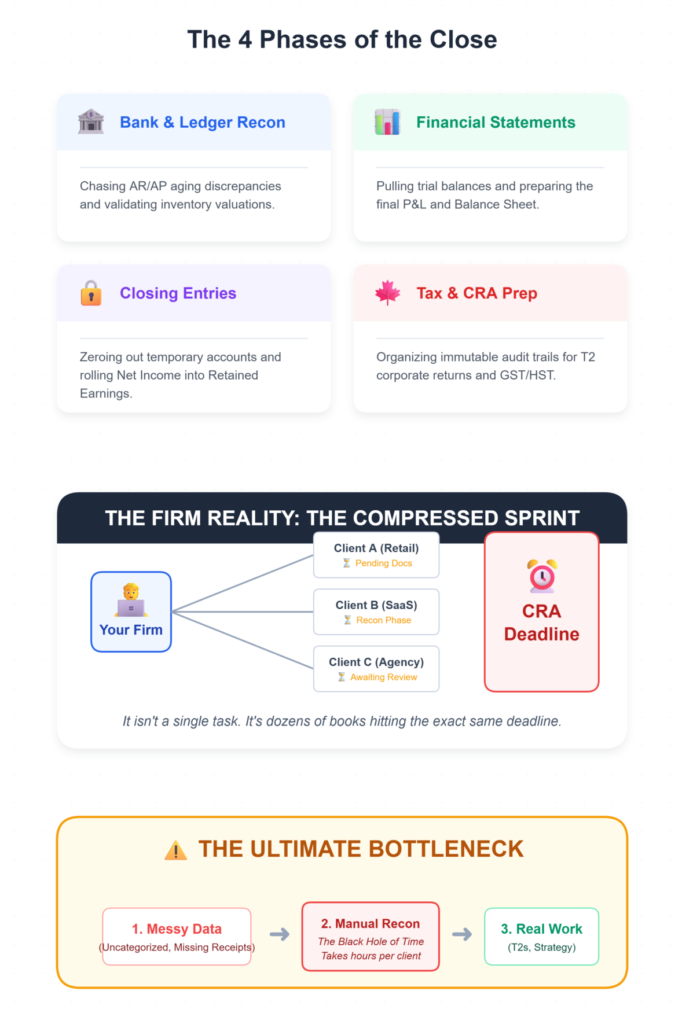
Year-end accounting is the process of closing a business’s financial books at the end of its fiscal year. It includes reconciling all bank accounts, preparing financial statements, posting closing entries to roll retained earnings, and organizing tax-ready data for filings like T2 corporate returns and GST/HST remittances.
For accounting firms managing multiple clients, year-end isn’t a single task. It’s a compressed sprint across dozens of books simultaneously. You’re pulling trial balances, chasing AR/AP aging discrepancies, validating inventory valuations, and making sure every adjustment has an immutable audit trail for CRA compliance.
The entire process hinges on clean data. And clean data, for most firms, means hours of manual reconciliation before the real accounting work even begins.
Why Is Year-End Accounting Challenging for Accounting Firms?
Year-end accounting is challenging because it concentrates an entire year’s worth of data cleanup, reconciliation, and compliance work into a compressed timeline—often while managing dozens of clients simultaneously.
Here’s what actually makes it painful:
- Volume spikes. December through March is peak season. Bank feeds that normally process smoothly start lagging. QBO users report integration sync delays exceeding 24 hours during peak December–January periods.
- Messy client data. Clients hand over shoeboxes of receipts, incomplete bank CSVs, and spreadsheets with creative categorization. About 70% of accountants cite bank reconciliation as their top year-end pain point, with manual fixes consuming 15+ hours per client.
- Multi-client segregation. Switching between client books without data bleed—where Client A’s AR accidentally shows up in Client B’s dashboard—is a real risk in multi-client environments without proper org-level permissions.
- Ghost duplicates. Bank feeds pulling uncategorized imports twice is one of those problems nobody warns you about until your trial balance is bloated with phantom transactions.
The standard advice—”just use cloud software”—misses the friction. The real question is which software handles these specific year-end pressures without creating new problems.
📉 The 15-Hour Cleanup Tax
Recent 2026 practice benchmarks show that without AI-assisted reconciliation, Canadian accountants spend an average of 15.2 unbillable hours per client during year-end simply fixing categorization errors, hunting down duplicate bank feed entries, and manually mapping data to T2 schedules.
The Pre-Flight Check: Are You Actually Ready for Year-End Software?
Before evaluating any tool, make sure you’ve locked down three things:
- Bank API access. Your clients’ Canadian bank feeds (RBC, TD, etc.) need to be connected and pulling transactions. No feeds, no automation.
- CRA EFILE credentials. If you’re filing T2 returns electronically, your EFILE certification needs to be current. Software can populate schedules, but it can’t fix an expired cert.
- A clear workflow goal. Can you describe what you want the software to do in one sentence? If the answer is vague—”make year-end easier”—you’ll end up buying features you don’t use.
Stop/Go test: If you can say “I need software that automates bank reconciliation and produces a clean trial balance for [X number of] clients by [date],” you’re ready. If not, define that first.
What Features Should Accounting Software Have for Year-End Accounting?
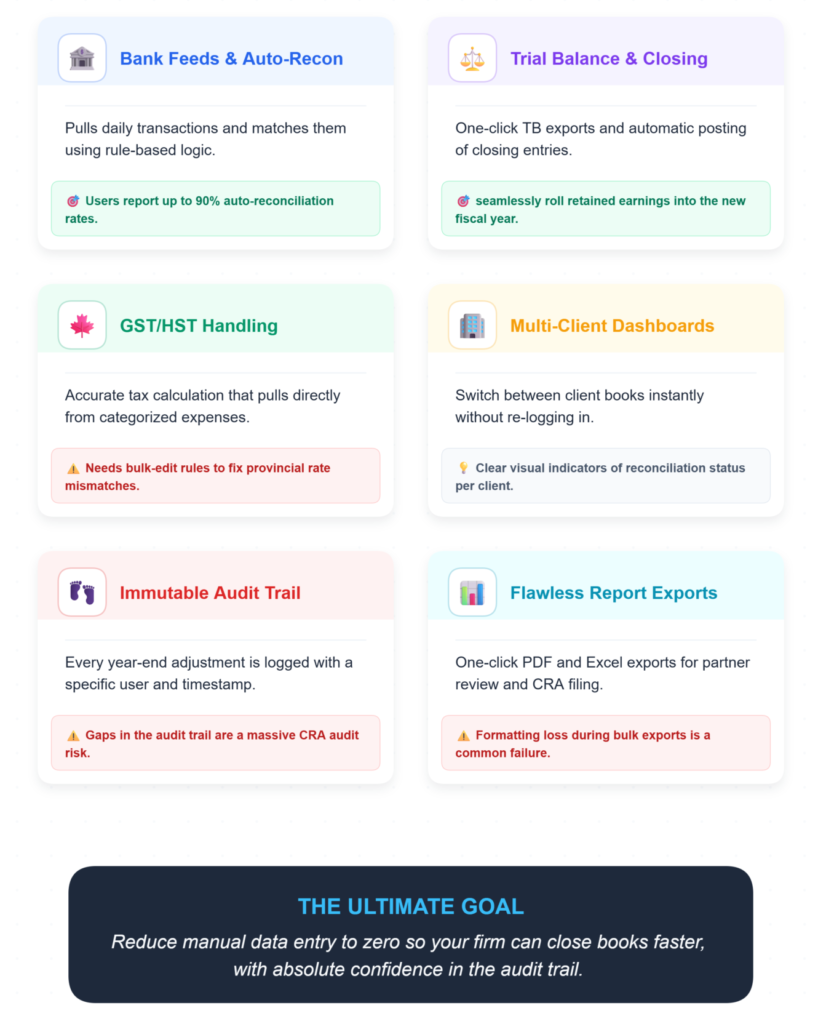
Year-end accounting software should include automated bank reconciliation, financial statement generation, multi-client management, tax module integration, and a reliable audit trail. These features reduce manual data entry and help firms close books faster with fewer errors.
Here’s what matters most in practice:
- Bank feeds and auto-reconciliation. The software should pull daily transactions and match them using rule-based logic. Sage 50 users report up to 90% of client transactions auto-reconcile, flagging only outliers for manual review.
- Trial balance and closing entries. One-click trial balance exports and automatic posting of closing entries to roll retained earnings into the new fiscal year.
- GST/HST handling. Accurate tax calculation that pulls from categorized expenses. Provincial rate mismatches on imported data are a common failure point—the tool needs bulk-edit rules to handle mixed rates.
- Multi-client dashboards. Switching between client books without re-logging in, with clear visual indicators for reconciliation status.
- Audit trail. Every year-end adjustment logged with user and timestamp. Gaps in the audit trail aren’t just messy—they’re a CRA audit risk.
- Report exports. One-click PDF and Excel exports for partner review and CRA filing. Formatting loss during bulk multi-client exports is a friction point worth testing before you commit.
What Are the Top 3 Accounting Software Tools for Year-End Accounting?
The three accounting software tools most suited for year-end accounting workflows in Canadian firms are QuickBooks Online, Sage 50, and LedgerNext. Each serves a different firm profile depending on client volume, tax complexity, and automation needs.
1. QuickBooks Online (QBO)
Overview: QuickBooks Online holds roughly 80% of the Canadian SMB market for year-end accounting tasks. It’s the default choice for many firms, particularly those handling straightforward bookkeeping and T1/T2 preparation.
Key Features:
- Bank feeds with custom matching rules and duplicate transaction detection
- GST/HST remittance wizard pulling from categorized expenses
- Progress invoicing for milestone-based billing (useful for construction clients)
- Trial balance export to Excel for partner review
- Bank rec exception flagging with duplicate transaction rules
Ideal Use Cases: Tax-only clients, small business bookkeeping, firms already embedded in the Intuit ecosystem.
Pros for Accounting Firms: Massive user base means strong community support; familiar interface reduces onboarding time; direct CRA EFILE support for T2 returns.
The friction nobody mentions: 40% of QBO users face integration sync delays exceeding 24 hours during peak December–January. And if you’re on a freemium plan, you’ll likely hit tax module limitations right when you need them most.
Visual checkpoint: When reconciliation is working properly, you’ll see green “Reconciled” badges on 95%+ of bank transaction lines. If you’re seeing red flags on more than 10% of lines, your matching rules need work.
2. Sage 50
Overview: Sage 50 is the go-to for firms already operating as Sage partners, particularly those handling annual accounts preparation and multi-currency clients. Users report up to 50% faster reconciliations compared to manual workflows.
Key Features:
- Auto-reconciliation handling up to 90% of client transactions automatically
- Multi-client dashboard with org-level permission controls
- AR/AP aging reports for identifying overdue invoices before year-end adjustments
- Multi-currency support without FX reconciliation headaches
- Immutable audit trail for every year-end adjustment
Ideal Use Cases: Sage partner firms, cross-border clients with multi-currency needs, firms prioritizing deep ledger control.
Pros for Accounting Firms: Deep desktop-to-cloud integration; strong bank feed reliability with Canadian institutions; robust audit trail that satisfies CRA documentation requirements.
The friction nobody mentions: Sage 50’s trial balance can drift by rounding errors on high-volume accounts. You’ll need to enable decimal precision in settings and re-reconcile AR/AP to catch these. Also, payroll imports require manual field mapping the first time.
Visual checkpoint: Multi-client dashboards should show orange “Unmatched” icons on fewer than 5% of transactions. If that number is higher, your categorization rules need attention before closing.
3. LedgerNext
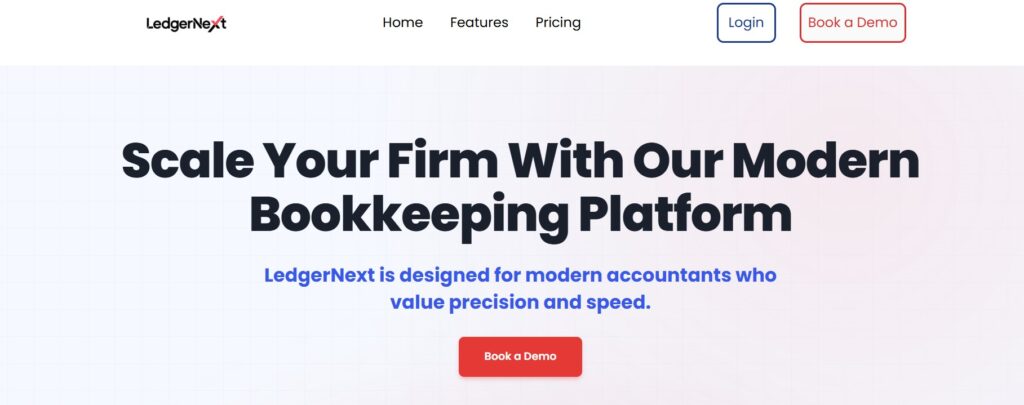
Overview: LedgerNext represents a newer category of bookkeeping automation platform built specifically for accounting firms handling high volumes of client files. Where QBO and Sage 50 are general accounting tools with year-end capabilities, LedgerNext focuses on the reconciliation-to-reporting pipeline that consumes most of a firm’s year-end hours.
Key Features:
- Automated bank statement ingestion—upload raw statements and the platform processes them
- AI-powered transaction categorization using rule-based and intelligent matching
- Fast bank reconciliation designed to reduce the 15+ hours per client that manual rec typically takes
- Tax-ready financial reporting with standardized data exports compatible with Canadian tax filing software
- Centralized client management dashboard for tracking reconciliation progress across multiple clients
Ideal Use Cases: Firms managing 20+ client books, practices looking to reduce manual data entry, tax preparers who need clean financials fast.
Pros for Accounting Firms: Purpose-built for the accountant’s workflow rather than adapted from SMB tools; reduces the data cleanup phase that typically precedes actual year-end accounting; Bank-grade encryption and SOC2-compliant infrastructure with Canadian data residency support.
Where it fits: If your year-end bottleneck is getting client data into a usable state—rather than the accounting itself—automation-focused platforms like LedgerNext address that specific gap. The platform handles the ingestion and categorization layer so you can focus on the judgment calls: adjusting entries, reviewing financials, and filing.
Comparison: Year-End Accounting Software
- 1. Primary Users
QBO: Tax preparers, SMB accountants
Sage 50: Sage partner firms, deep ledger practices
LedgerNext: High-volume accounting firms - 2. Bank Reconciliation
QBO: Rule-based matching with exception flagging
Sage 50: Auto-reconciliation features
LedgerNext: Automated ingestion + AI categorization - 3. Automation Level
QBO: Moderate (bank feeds + rules)
Sage 50: Moderate-High (auto-rec + multi-currency)
LedgerNext: High (statement ingestion to tax-ready report) - 4. Canadian Tax Support
QBO: GST/HST, T2 EFILE
Sage 50: GST/HST, deep provincial compliance
LedgerNext: GST/HST/QST, T2-compatible exports
The “Ugly Truth”: Ghost Errors Nobody Warns You About
Here’s the troubleshooting guide I wish someone had given me three years ago:
Problem 1: Duplicate transactions bloating trial balance
Context: Bank feeds pulling uncategorized imports twice.
The Weird Fix: Force-match via custom rules in QBO/Sage 50, then exclude future duplicates by payee keyword.
Problem 2: GST/HST calc mismatches on remittances
Context: Mixed provincial rates in imported client data.
The Weird Fix: Use bulk-edit rules tagging provinces from invoice addresses before running reconciliation.
Problem 3: CRA EFILE rejecting T2 XML
Context: XML schema drift after software updates.
The Weird Fix: Export to XML, validate via the free CRA web tool, then re-import the fixed file.
Problem 4: Reports taking 5+ minutes to load
Context: High-volume uncached multi-client data bogging down cloud platforms.
The Weird Fix: Archive prior years’ books into sub-ledgers, and run reports on the active fiscal year only.
Verification: After fixing any of these, randomly sample 20 bank transactions. If more than 90% auto-match green, proceed. If your trial balance shows debit/credit variances greater than $1, stop and drill down before closing.
How Do You Choose the Right Accounting Software for Year-End?
It depends on where your year-end bottleneck actually sits.
If your firm is already in the Intuit ecosystem and handles straightforward Canadian tax clients, QBO is the path of least resistance. You know the interface, your staff knows the interface, and the CRA EFILE integration works.
If you’re a Sage partner firm or handle cross-border clients with multi-currency needs, Sage 50 gives you deep ledger control and a powerful desktop-hybrid experience.
If your bottleneck is the data preparation phase—converting raw bank statements into categorized, reconciled, tax-ready financials across dozens of clients—that’s where automation-focused platforms like LedgerNext change the math. The initial setup takes 2–4 weeks for migration and rule configuration, but firms typically see 40–60% time savings on reconciliation within 3–6 months.
No single tool is perfect. The right choice is the one that eliminates your specific friction point, not the one with the longest feature list.
The Ultimate Alternative: Why LedgerNext Changes the Year-End Game
While legacy tools like QuickBooks Online and Sage 50 require you to adapt your workflow to their specific limitations, LedgerNext is purpose-built as the ultimate alternative for Canadian accounting firms facing year-end compression.
Instead of manually downloading, formatting, and uploading bank CSVs to a generic accounting tool, LedgerNext allows you to securely ingest raw bank statements directly. The platform’s AI categorization engine learns your firm’s specific reconciliation patterns, reducing the typical 15+ hours of manual year-end cleanup per client down to minutes.
More importantly, LedgerNext bridges the exact gap where most accountants lose their margin during year-end: tax readiness. It produces export-ready reports formatted specifically for Canadian GST/HST/QST and T2 workflows—eliminating the unbillable hours spent mapping exported trial balances in Excel.
Frequently Asked Questions
What software is best for year-end accounting?
The best year-end accounting software depends on your firm’s needs. QuickBooks Online suits tax-focused practices with straightforward client books. Sage 50 works well for partner firms handling deeper ledger needs. LedgerNext is designed for firms that need automated bank statement processing and fast reconciliation across many client files. Each tool addresses different workflow bottlenecks.
What tools do accountants use for year-end closing?
Canadian accountants commonly use QuickBooks Online, Sage 50, and Caseware for year-end closing tasks including bank reconciliation, trial balance preparation, and GST/HST reporting. Newer automation platforms like LedgerNext handle bank statement ingestion and transaction categorization, reducing the manual data entry that typically precedes the closing process for multi-client firms.
How can accounting software simplify year-end accounting?
Accounting software simplifies year-end accounting by automating bank reconciliation, categorizing transactions using rules-based matching, generating financial statements, and preparing tax-ready data exports. This reduces manual entry errors and cuts reconciliation time significantly. Firms using auto-reconciliation tools report up to 50% faster year-end processing compared to spreadsheet-based workflows.
What features should year-end accounting software include?
Year-end accounting software should include automated bank feeds, rule-based transaction matching, trial balance generation, GST/HST calculation, multi-client management, closing entry automation, audit trail logging, and one-click report exports. Canadian firms should also verify CRA EFILE compatibility and support for provincial tax rates to avoid remittance errors during filing season.
Can accounting software automate bank reconciliation?
Yes. Tools like Sage 50 auto-reconcile up to 90% of client transactions, flagging only exceptions for manual review. QuickBooks Online uses custom matching rules to reduce manual reconciliation. Platforms like LedgerNext go further by ingesting raw bank statements and using AI-powered categorization to prepare reconciliation-ready data, reducing the 15+ hours per client that manual bank rec typically requires.
How long does it take to set up year-end accounting software?
Initial setup including data migration, bank feed connections, and categorization rules typically takes 2–4 weeks. Full automation ROI—where reconciliation and reporting workflows run significantly faster—usually appears within 3–6 months. Adding multi-client templates for scaling across your firm’s portfolio may require an additional 1–2 months of configuration and testing.
Year-end accounting doesn’t have to mean late nights and $0.37 trial balance mysteries. The right software—matched to your actual workflow bottleneck—turns a chaotic sprint into a repeatable process.
Whether that’s QBO for simplicity, Sage 50 for depth, or LedgerNext for automated reconciliation and tax-ready reporting, the goal is the same: spend less time cleaning data and more time doing the work that actually requires your expertise.
Make This Your Last Manual Year-End.
Stop spending 15+ hours cleaning up client bank feeds. LedgerNext uses AI to turn raw bank statements into categorized, tax-ready financial data so you can actually focus on closing the books.
✅ Automated Bank Ingestion
✅ AI Transaction Categorization
✅ GST/HST/QST Tax-Ready Exports