

Last tax season, I watched a three-person firm spend an entire Monday—every single Monday—just matching bank transactions to client ledgers.
Not complex forensic work. Just… data cleanup. By Wednesday they’d start chasing documents through email threads that read like archaeological digs.
By Friday, they’d barely touched actual advisory work.
That firm isn’t unusual. It’s the norm.
Manual workflows don’t scale. And when you’re managing 40, 60, 100+ client books across CRA deadlines, T2 filings, and GST/HST cycles, the hours bleed out in places most firms don’t even measure.
So I spent the better part of three months pressure-testing the tools that Canadian accounting firms actually use to claw back those hours.
Not a generic listicle. A forensic look at what saves time, what secretly costs more than it saves, and where the real workflow bottlenecks hide.
Quick Answer: What Tools Help CPA Firms Save Time?
CPA firms consistently save 10+ hours per week by automating five core workflow stages:
- Bank reconciliation & data processing → saves 5–8 hours/week
- Client document collection → saves 3–5 hours/week
- Financial reporting → saves 2–4 hours/week
- Workflow & task management → saves 2–3 hours/week
- Tax preparation & compliance → saves 1–3 hours/week
Automated reconciliation tools can reduce manual bookkeeping time by up to 70% for CPA firms managing multiple clients.
The compounding effect across categories is where most firms cross the 10-hour threshold.
The TL;DR Matrix
- Category: Time Tracking & Billing
Top Pick: Toggl Track
One Reason Why: One-click billable hour capture with zero learning curve - Category: Invoicing & Expenses
Top Pick: Harvest
One Reason Why: Native invoice generation tied directly to tracked hours - Category: Workflow Automation
Top Pick: FinancialCents
One Reason Why: Built specifically for accountant task pipelines - Category: Tax Season Scaling
Top Pick: Jetpack Workflow
One Reason Why: Standardized checklists that prevent busy-season chaos - Category: All-in-One Client Management
Top Pick: TaxDome
One Reason Why: Client portal + CRM + time tracking in a single login - Category: QuickBooks Ecosystem
Top Pick: QuickBooks Time
One Reason Why: Seamless sync if you’re already in that world - Category: Reconciliation & Data Processing
Top Pick: LedgerNext + batch tools
One Reason Why: Raw bank data → tax-ready financials without manual cleanup
Where Time Actually Disappears in CPA Firms
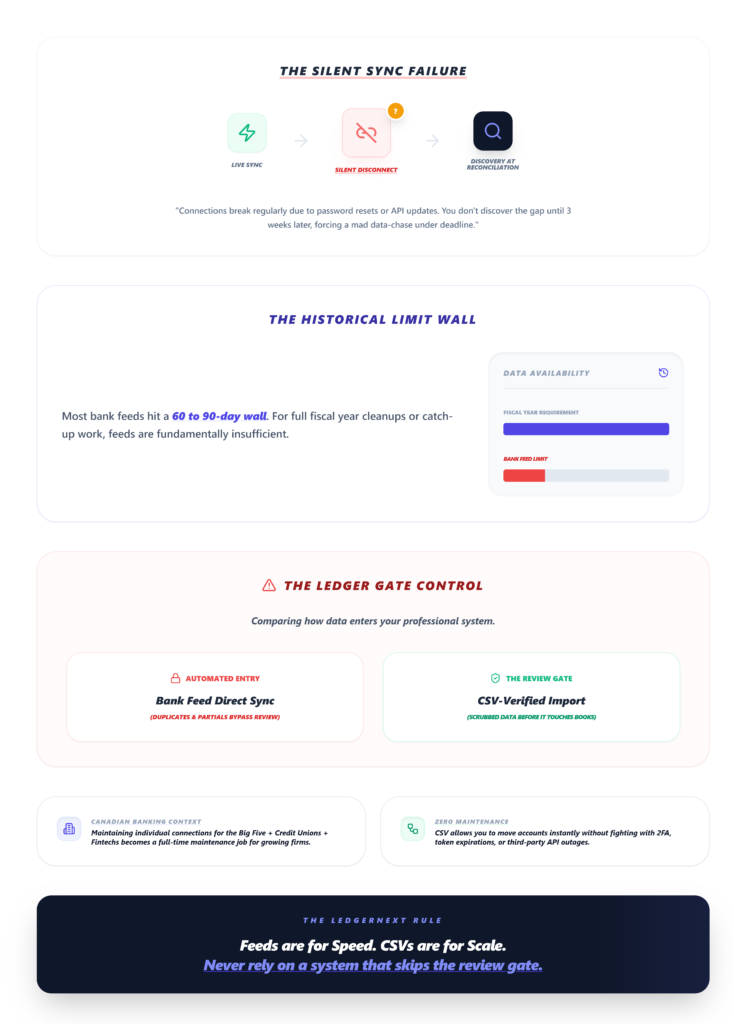
Before picking tools, you need to know where the hours go.
I’ve tracked this across conversations with dozens of Canadian accounting firms, and the pattern is consistent:
Data collection and client communication eat the most invisible time. You’re not just waiting for documents—you’re sending the third follow-up email, re-explaining what format you need the bank statements in, and then manually converting whatever arrives into something usable.
Reconciliation is the second-biggest drain. Batch reconciliation across 20+ client accounts, especially when bank feeds don’t match cleanly, turns into a spreadsheet nightmare.
Common bank reconciliation errors compound when you’re handling volume.
Reporting should be fast but rarely is. Pulling together financial statements for multiple clients—especially when data lives in disconnected tools—creates a manual assembly process that shouldn’t exist in 2025.
Internal workflow tracking rounds it out. Who’s working on which client? What’s overdue? Where’s that T2 file sitting? Without a system, you’re managing by Slack message and memory.
The Selection Framework: How I Evaluated These Tools
I didn’t just read feature pages. Here’s what actually mattered:
Time-to-Value came first. How fast can a firm go from signup to first automated output? If setup takes a full day (I’m looking at you, TaxDome), that’s a real cost. One-click tracking versus a 45-minute onboarding wizard makes a material difference during tax crunch.
UX Friction was the silent killer. Several tools with great feature sets lost points because their mobile interfaces felt like they were built in 2014. Mobile timesheet syncing matters when your team does field audits or works remotely across Canadian cities.
3-Year Total Cost of Ownership (TCO) revealed the ugly truth. Free tiers lure you in, but scaling penalties—where costs jump 3x when you add your tenth user—change the math entirely. I weighted this heavily for mid-sized firms.
Integration Depth with QuickBooks, Xero, and Canadian tax software determined whether a tool creates workflow or just adds another silo. If you’re weighing the QuickBooks vs Xero comparison for your firm, integration compatibility should drive your tool selection.
Busy Season Scalability tested whether these tools hold up when you’re processing 200% of normal volume during T2 and GST filing periods. Some tools that feel smooth in June completely buckle in March.
Feature Comparison Matrix
- Tool: LedgerNext
Best For: Firms managing 20+ client books, practices looking to reduce manual data entry
Standout Feature: Automated bank statement ingestion & AI categorization
Hidden Limit: Focuses on reconciliation-to-reporting pipeline, not general accounting
3-Year TCO (1–10): 9 - Tool: Toggl Track
Best For: Solo CPAs, simple tracking
Standout Feature: One-click timer with idle detection
Hidden Limit: Limited invoice customization for complex billing
3-Year TCO (1–10): 9 - Tool: Harvest
Best For: Invoicing + expense tracking
Standout Feature: Time-to-invoice pipeline
Hidden Limit: Clunky receipt uploads at volume
3-Year TCO (1–10): 7 - Tool: Bill4Time
Best For: Detailed billing reports
Standout Feature: Deep reporting dashboards
Hidden Limit: Dated mobile UI kills field momentum
3-Year TCO (1–10): 6 - Tool: QuickBooks Time
Best For: QuickBooks-native firms
Standout Feature: GPS tracking for remote teams
Hidden Limit: Costs explode outside QB ecosystem
3-Year TCO (1–10): 5 - Tool: TimeCamp
Best For: Productivity monitoring
Standout Feature: App usage heatmaps
Hidden Limit: Intrusive tracking alienates client-facing staff
3-Year TCO (1–10): 7 - Tool: FinancialCents
Best For: Accountant-specific workflows
Standout Feature: Kanban-style client task boards
Hidden Limit: No free tier; linear cost scaling
3-Year TCO (1–10): 6 - Tool: Jetpack Workflow
Best For: Tax season standardization
Standout Feature: Recurring checklist templates
Hidden Limit: Limited beyond basic tax prep workflows
3-Year TCO (1–10): 7 - Tool: TaxDome
Best For: Full CRM + client portal
Standout Feature: All-in-one client management
Hidden Limit: Steep learning curve for non-CRM users
3-Year TCO (1–10): 5
The Forensic Roundup: Tools That Actually Save the Hours
🧾 1. Bank Reconciliation & Data Processing Tools (Saves 5–8 Hours/Week)
This is the single highest-impact category. Period.
Most Canadian accounting firms still process bank data semi-manually—downloading CSVs, reformatting columns, categorizing transactions one by one, and then reconciling against client ledgers.
For firms handling 30+ client books, that’s easily 8–10 hours of pure data labor every week.
Overview: LedgerNext represents a newer category of bookkeeping automation platform built specifically for accounting firms handling high volumes of client files. Where QBO and Sage 50 are general accounting tools with year-end capabilities, LedgerNext focuses on the reconciliation-to-reporting pipeline that consumes most of a firm’s year-end hours.
Key Features:
- Automated bank statement ingestion—upload raw statements and the platform processes them
- AI-powered transaction categorization using rule-based and intelligent matching
- Fast bank reconciliation designed to reduce the 15+ hours per client that manual rec typically takes
- Tax-ready financial reporting with standardized data exports compatible with Canadian tax filing software
- Centralized client management dashboard for tracking reconciliation progress across multiple clients
Ideal Use Cases: Firms managing 20+ client books, practices looking to reduce manual data entry, tax preparers who need clean financials fast.
Pros for Accounting Firms: Purpose-built for the accountant’s workflow rather than adapted from SMB tools; reduces the data cleanup phase that typically precedes actual year-end accounting; Bank-grade encryption and SOC2-compliant infrastructure with Canadian data residency support.
Where it fits: If your year-end bottleneck is getting client data into a usable state—rather than the accounting itself—automation-focused platforms like LedgerNext address that specific gap. The platform handles the ingestion and categorization layer so you can focus on the judgment calls: adjusting entries, reviewing financials, and filing.
Built for Speed. Designed for Accountants. Explore the features that turn raw client data into CRA-ready returns in minutes.
Bank Reconciliation
Stop wasting hours on manual data entry. LedgerNext automatically ingests client bank statements and matches transactions using intelligent rules. You’ll save time, reduce errors, and free your team to focus on advisory work.
What you get:
- Bulk import across multiple accounts
- Smart transaction matching that learns your workflow
- Rapid exception handling with intuitive tools
Tax Preparation
Move smoothly from reconciliation into filing. Once transactions are matched, LedgerNext takes reconciled data and transforms it into formats ready for Canadian tax filing. That means standardized, compliance-focused outputs that help you cut review time and eliminate last-minute scrambling.
What you get:
- Ready-to-file tax mapping
- Compliance-first data exports
- A streamlined year-end review process
Financial Reporting
Get insight instantly. LedgerNext generates key financial reports as soon as data is reconciled. You can pull up profit and loss statements and balance sheets in one click, then drill down into details that matter for client conversations and planning.
What you get:
- One-click financial statements
- Deep transaction drill-downs
- Clean, professional formats built for accountants
Manage All Your Clients in One Place
No more jumping between tools, spreadsheets, or folders. LedgerNext gives you a single dashboard to manage all your clients, their accounts, and their financial data. Everything stays organized, accessible, and easy to track as your firm grows.
What you get:
- Centralized view of all client accounts
- Quick access to reconciliations, reports, and tax data
- Clear status tracking across multiple clients
Ready to transform your firm’s workflow? Join hundreds of Canadian accountants using these features to save hours on every client file.
The batch reconciliation capability matters most here—processing bulk transactions across multiple client accounts without manual line-item matching.
The “Sticker vs. Reality” gap: Most reconciliation tools promise “automated matching,” but the reality is that first-time setup requires building categorization rules for each client.
The time savings are real—but they compound over months, not days.
Expect the first two weeks to feel like you’re investing time rather than saving it.
Visual checkpoint: When batch processing completes correctly, your transaction dashboard should show green status indicators across all matched entries. If you’re seeing yellow flags on more than 15% of transactions, your categorization rules need refinement.
Scaling reality: Solo practitioners processing 5 client books see moderate gains.
Firms handling 30+ books see the math change dramatically—what took a full-time bookkeeper becomes a 2-hour weekly review process.
📂 2. Client Document Collection Tools (Saves 3–5 Hours/Week)
TaxDome dominates here with its client portal. Clients upload documents directly, e-sign engagement letters, and receive automated reminders—all without a single email from your team.
The “Sticker vs. Reality” gap: TaxDome markets itself as “all-in-one,” and it genuinely is.
But that learning curve is steep. Early users consistently report that initial setup ate a full day, and non-CRM-experienced staff needed an additional week to feel comfortable.
The client portal notifications badge turns green on signed documents, which is satisfying—but getting clients to actually use the portal requires its own onboarding effort.
Scaling penalty: Higher tiers run $50+/user for full automation features.
For a 10-person firm, that’s $6,000+ annually before you’ve added any other tools.
Small firms with straightforward client communication might find this is overkill.
Ghost error worth knowing: Integration limits appear on lower tiers that aren’t well-documented.
The weird fix: temporarily upgrade to sync all client data, then evaluate whether the higher tier justifies the cost long-term.
For firms not ready for TaxDome’s complexity, Harvest handles document-adjacent workflows through its expense and receipt tracking—though forum reports consistently flag clunky receipt uploads when you’re processing high volumes of bank transaction documentation.
The blue progress bar fills during invoice approval but stalls yellow on unmatched expenses, which becomes a visual headache at scale.
📊 3. Financial Reporting Tools (Saves 2–4 Hours/Week)
Bill4Time offers the deepest reporting dashboards in this roundup.
The pie chart visualization turns green at 90% billable utilization and red on overdue invoices—useful for partners who need a quick pulse on firm health.
The reality check: That dashboard looks great on desktop. On mobile? It’s a different story.
The UI feels dated, and slow mobile load times during year-end reviews frustrated every practitioner I spoke with.
“Bill4Time mobile is clunky for field audits—dated UI kills momentum on busy season” was a sentiment I heard more than once.
Scaling penalty: The solo free tier jumps to $20/user/month at Enterprise level, with custom configuration fees adding 20–30% to annual costs.
Those config fees aren’t obvious during signup.
Ghost error: The invoicing module lags on bulk sends.
The weird fix that actually works: clear your browser cache and log in via incognito mode. Sounds absurd. Works consistently.
For firms that need quick financial reports without the reporting-tool overhead, the reconciliation-first approach works better—clean data in means clean reports out, without a separate reporting layer.
If you’re exploring year-end accounting tools, start with your data pipeline before adding dashboards.
📅 4. Workflow & Task Management Tools (Saves 2–3 Hours/Week)
Two tools stand out here, and they serve different firm profiles:
FinancialCents is purpose-built for accountants. The kanban-style workflow cards turn green on task completion and yellow on overdue automations.
It’s the closest thing to a project management tool that actually understands accounting firm workflows—client onboarding sequences, recurring monthly tasks, and deadline-driven assignments.
The catch: No free tier. At $29/user/month with linear scaling and no volume discounts, a 10-person firm is spending $3,480/year.
Task assignment bugs in multi-client setups have been reported by early users, though the team appears to be actively patching.
One practitioner told me: “FinancialCents automated my client onboarding—cut reconciliation emails by half.” That’s a real outcome.
Jetpack Workflow takes a different angle: workflow standardization through recurring checklist templates.
The checklist progress bar fills blue as each standardized step completes.
For tax season, this is gold—every T2 file follows the same process, every GST return hits the same checkpoints, and nothing falls through the cracks.
The limit: Document management is basic. Don’t expect deep bank feed integration or reconciliation capabilities.
This is a process tool, not a data tool. At $30/user/month from startup, with collaboration fees layered on for mid-size firms, it’s an investment in consistency rather than automation.
🧾 5. Time Tracking & Billable Hour Capture (Saves 1–3 Hours/Week)
Toggl Track remains the default recommendation for firms that need clean billable hour capture without complexity.
The green one-click timer icon signals active tracking, and the red idle detection flag triggers at 5+ minutes of inactivity—saving roughly 2 hours per week in forgotten or estimated time entries during tax crunch.
Scaling penalty that matters: Free for up to 5 users, but the Growth tier jumps to $20/user/month.
For a 10-person team, that’s $9,000/year for what’s essentially a timer with reporting.
The Pomodoro timer occasionally desyncs on mobile—force-quit and relaunch through your task manager if it happens.
QuickBooks Time makes sense only if you’re already deep in the QuickBooks ecosystem.
The GPS tracking shows a green pin for verified location clock-ins and orange for geofence breaches—useful for firms with remote bookkeepers across Canadian cities.
But GPS drifts in dense urban areas. The fix: disable battery saver mode on Android devices.
The cost reality: $20/user/month base climbs to $50/user with advanced reporting add-ons.
If you’re not already on QuickBooks, this creates ecosystem lock-in that’s hard to justify.
Firms exploring alternatives for Canadian accountants should weigh this carefully.
TimeCamp offers app usage monitoring and productivity heatmaps—blues for low-productivity applications, oranges for high-billable work.
But here’s the tension: app usage tracking feels intrusive in firms that operate on client trust.
At $7.99/user/month for Premium, it’s affordable, but the cultural fit matters more than the price.
Goal monitoring occasionally resets without warning; re-sync via the desktop widget restart.
Real Workflow Example: Before and After
The Old Way (Manual):
- Download bank statements from 6 different institutions → 45 minutes
- Reformat CSVs into usable templates → 30 minutes per client
- Manually categorize transactions in spreadsheets → 2–3 hours
- Email clients for missing documents → 20 minutes per client, repeated 2–3 times
- Reconcile against QuickBooks/Xero → 1–2 hours per client
- Track progress in a shared spreadsheet → constant interruptions
- Generate financial reports manually → 1 hour per client
Total for 10 clients: 25–35 hours/week
The New Way (Automated Stack):
- Bank data auto-ingested and batch-processed → 30 minutes total
- Client documents collected via portal with automated reminders → near-zero time
- Transaction categorization handled by rule-based automation → 1 hour review
- Reconciliation flagged by exception only → 1–2 hours total
- Workflow progress tracked on centralized dashboard → glanceable
- Financial reports generated from clean data → 15 minutes per client
Total for 10 clients: 8–12 hours/week
That’s the 10+ hour gap. And it compounds as you add clients.
Which Accounting Tools Are Best for Multi-Client Firms?
For Canadian accounting firms managing 20+ client books, the tool selection changes. Here’s how to think about it:
Firm size under 5 people: Toggl Track (free tier) + Jetpack Workflow + a solid reconciliation tool like LedgerNext.
Keep costs under $100/month total. Don’t overcomplicate.
Firm size 5–15 people: FinancialCents for workflow + TaxDome for client management + dedicated reconciliation automation with LedgerNext. Budget $300–600/month.
The workflow standardization pays for itself during CRA deadline periods.
Firm size 15+: Full stack with enterprise tiers. At this scale, the 3-Year TCO analysis becomes critical—Bill4Time’s configuration fees and QuickBooks Time’s per-user costs compound fast.
Capacity tracking and resource planner integration become non-negotiable.
The key factor most firms underweight: integration depth between tools.
A $30/month tool that syncs natively with your accounting software saves more time than a $10/month tool that requires manual data export.
Every manual handoff between systems is a hidden tax on your team’s week.
Summary: Time Saved by Tool Category
- Category: Reconciliation & Data Processing
Weekly Time Saved: 5–8 hours
Best Entry Point: Batch processing tools with rule-based categorization - Category: Client Document Collection
Weekly Time Saved: 3–5 hours
Best Entry Point: Client portal with automated reminders - Category: Financial Reporting
Weekly Time Saved: 2–4 hours
Best Entry Point: Clean data pipeline → auto-generated reports - Category: Workflow Management
Weekly Time Saved: 2–3 hours
Best Entry Point: Accountant-specific task boards - Category: Time Tracking & Billing
Weekly Time Saved: 1–3 hours
Best Entry Point: One-click timers with idle detection
Ready to cut reconciliation time first?
Most firms find the biggest ROI starts with automating bank data processing.
LedgerNext converts raw bank statements into categorized, tax-ready financials—built specifically for Canadian accounting workflows including T2 and GST compliance.
FAQs
How do I switch from Toggl to Harvest without losing historical billable data?
Export your Toggl data as a detailed CSV with project tags intact. Harvest accepts CSV imports, but you’ll need to map Toggl’s project structure to Harvest’s client/project hierarchy manually. Run both tools in parallel for two weeks to verify billable totals match before fully migrating. Budget 2–3 hours for the transition.
How do I fix QuickBooks Time GPS drift in Canadian cities?
GPS drift in dense urban areas—Toronto’s Financial District, downtown Vancouver—is a known issue. Disable battery saver mode on Android devices first. If drift persists, enable Wi-Fi-assisted location in your device settings. QuickBooks Time uses geofence boundaries, so widening the fence radius by 50 meters usually resolves false breach alerts.
How do I batch reconcile bank feeds for 50+ clients in a single workflow?
Start with tools that support rule-based categorization across multiple accounts simultaneously. Upload bank data in bulk rather than client-by-client. Build master categorization rules that apply across similar client profiles (e.g., all retail clients share common transaction categories), then customize exceptions per client. This approach cuts setup time by roughly 60%.
How do I customize Harvest invoices for CPA-specific GST/HST rules?
Harvest’s default invoice templates don’t natively handle Canadian GST/HST line items. Use the custom fields feature to add tax registration numbers and rate breakdowns. For QST requirements in Quebec, you’ll need to manually add a secondary tax line—Harvest doesn’t support dual provincial tax calculations automatically.
How do I scale Jetpack Workflow automations for year-end tax surges?
Duplicate your standard T2 workflow template and create a “surge” version with compressed timelines and additional review checkpoints. Assign overflow tasks to specific team members using capacity tracking views. The key: build your surge templates in October, not February. Pre-loading recurring checklists before busy season prevents the scramble that defeats the purpose of having a workflow tool.
How do I disable intrusive tracking in TimeCamp while keeping billable hour data?
In TimeCamp’s settings, toggle off “Computer Activities” tracking while keeping “Time Entries” active. This preserves manual and timer-based billable hour capture without monitoring which applications your team uses. The productivity heatmaps will lose granularity, but most client-facing CPA firms find that’s an acceptable trade-off for maintaining team trust.
The math here isn’t complicated. Every hour your team spends on manual data processing, document chasing, or spreadsheet reconciliation is an hour not spent on advisory work, client relationships, or—honestly—just going home at a reasonable time.
The firms pulling ahead aren’t using dramatically different tools. They’re just automating the repetitive layers so their people can do the work that actually requires a CPA designation.
Start with reconciliation. That’s where the biggest time gap lives.
Explore LedgerNext’s approach to automated bank data processing →