

Last tax season, a mid-sized Canadian accounting firm I spoke with lost an entire day — not to a complex filing, not to a CRA audit — but to a bank sync failure. QuickBooks dropped the connection mid-reconciliation across four client accounts. Three hours of manual matching. Missed deadlines. A partner pulling data into Excel at 11 PM.
That firm didn’t have a “bad software” problem. They had a workflow misalignment problem. They’d picked their platform based on brand recognition and monthly cost, not on how their team actually moves through client work.
Most CPA firms make this exact mistake. And it costs them far more than the subscription fee.
By the end of this guide, you’ll have a practitioner-tested framework for evaluating bookkeeping software — built around how accounting firms actually operate, not how vendors want you to think you operate.
Quick Answer: What Features Should CPA Firms Look for in Bookkeeping Software?
CPA firms handling multiple clients require bookkeeping software that supports automation, consistency, and scalable workflows. Specifically, look for:
- Automated bank reconciliation that syncs reliably across dozens of accounts
- Rule-based transaction categorization for consistent coding firm-wide
- Multi-client management from a centralized dashboard
- Tax-ready financial outputs (T2, GST/HST, 1099 workflows)
- Secure client data handling with audit trail logs and Canadian compliance
If your firm is managing 50+ clients, software that doesn’t support automation and bulk processing will slow you down significantly.
Why the Right Bookkeeping Software Actually Matters
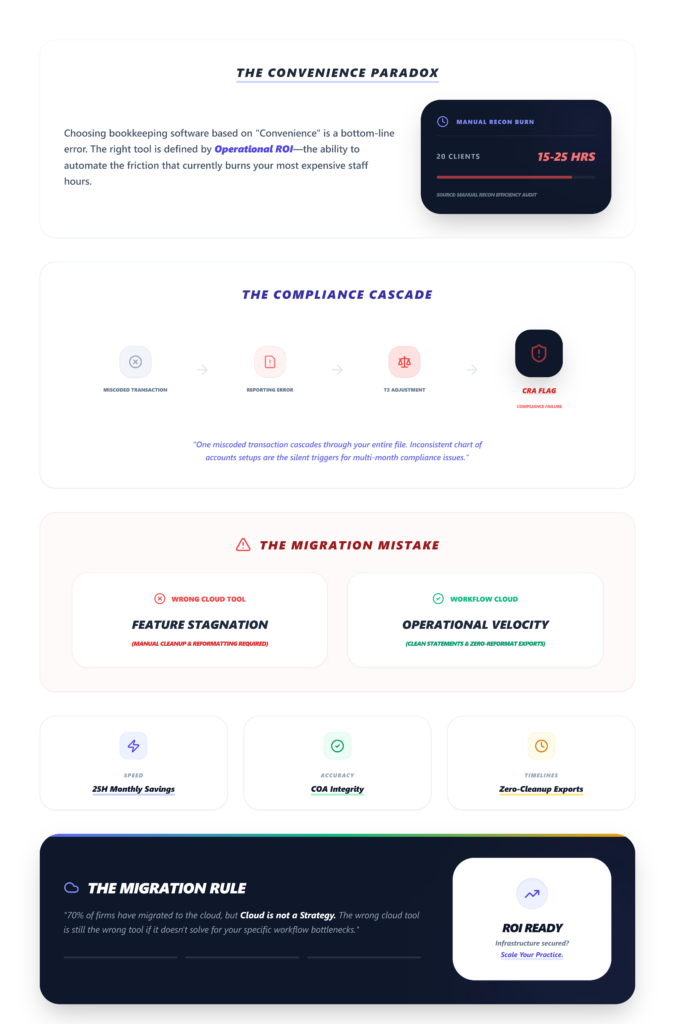
This isn’t about convenience. It’s about three things that directly hit your bottom line:
- Speed. Manual reconciliation across even 20 clients eats 15–25 hours a month. Multiply that during tax season, and you’re burning senior staff on data entry instead of advisory work.
- Accuracy. Poor categorization cascades. One miscoded transaction becomes a reporting error, becomes a T2 adjustment, becomes a CRA flag. I’ve seen firms trace compliance issues back to inconsistent chart of accounts setups that went unchecked for months.
- Tax filing timelines. If your software can’t generate clean financial statements without hours of manual cleanup, you’re always behind. CRA deadlines don’t move because your GL export needs reformatting.
70% of CPA firms have migrated to cloud-based platforms by 2025, largely for remote access and real-time collaboration. But migrating to the cloud doesn’t automatically solve these problems. The wrong cloud tool is still the wrong tool.
Key Features to Evaluate
Here’s where most “best software” listicles fall apart — they give you a feature checklist without context. I’m going to walk through each feature the way an accounting firm actually encounters it during client work.
1. Automated Bank Reconciliation
This is the backbone. If your software can’t pull bank feeds reliably and match transactions without constant hand-holding, everything downstream breaks.
What to test during demos: sync three client bank feeds simultaneously. If all transactions match within five minutes without errors, that’s a go. If more than 10% require manual intervention, stop. That failure rate compounds fast across a full client roster.
Here’s what vendors won’t tell you: bank sync issues affect 20–30% of sessions during high-volume periods, according to practitioner reports. API rate limits during tax season cause feeds to lag or drop entirely. The community workaround? Schedule syncs off-peak — some firms run them at 2 AM with secondary bank feeds as backup.
If your team is still spending hours on bank reconciliation errors, the software isn’t doing its job.
Visual checkpoint: You should see green “Synced” badges across all connected accounts, with transaction counts matching your bank statements within a 24-hour window.
2. Rule-Based Transaction Categorization
Consistency is the thing that separates a firm that scales from one that just… grows and gets messier.
Rule-based categorization means you set coding rules once — “all transactions from Vendor X go to Office Supplies under COA 5200” — and the system applies them across every client where that logic holds. No more junior staff guessing. No more inconsistent GL entries between team members.
The alternative is manual categorization, which introduces variance. And variance in your chart of accounts is how you end up with reporting inaccuracies that surface during tax prep — exactly when you don’t have time to fix them.
Test this: track whether the system correctly auto-categorizes 50 sample transactions using your rules. If you’re exporting to Excel to verify, that’s a red flag.
The difference between rule-based categorization vs manual approaches is massive at scale. It’s not a “nice to have.” It’s the difference between a 10-minute review and a 2-hour cleanup per client, per month.
3. Multi-Client Management
This is where SMB-focused tools fall apart for CPA firms.
You need a centralized dashboard that lets you switch between clients without logging in and out. You need bulk operations — running reconciliations, generating reports, or reviewing categorization exceptions across multiple entities from one view.
Multi-entity accounting is standard in platforms built for firms, but it’s often an expensive add-on (or simply absent) in tools designed for individual businesses. Sage Intacct handles this well for larger firms. But the real question is: can your team see the status of all active clients at a glance? Which clients have unreconciled transactions? Which ones are ready for month-end close?
If the answer requires opening 30 separate tabs, you’ve already lost.
Verification: Run a multi-entity consolidated P&L report. If it appears instantly with accurate data, you’re good. If the entity selector crashes or takes more than 30 seconds, that’s a deal-breaker for any firm with volume.
4. Tax-Ready Financial Reporting
For Canadian accounting firms, this means T2 corporate returns and GST/HST workflows specifically. For US-focused firms, it’s 1099s, 941s, W-2 generation.
The key phrase here is “tax-ready.” Not “exportable.” Not “customizable with enough effort.”
The reports your software generates should map directly to CRA or IRS filing requirements without intermediate reformatting.
Test this during your evaluation: generate a sample 941 or T2-ready output. If the e-file button activates with no warnings and state/province-specific fields are populated, that’s a go. If fields are blank or you’re getting compliance flags, check whether the vendor’s tax tables are current — outdated state and provincial tax tables are a known friction point, and some vendors lag on updates, risking penalties.
Tax form generation that works with one click for high-volume filings isn’t a luxury. It’s baseline.
5. Security and Compliance
Every transaction needs solid audit trail logs. Full stop. This isn’t optional — it’s how you survive CRA reviews and IRS audits.
Look for:
- Immutable audit trails (lock symbols on every posted transaction)
- Role-based access controls (your bookkeeper shouldn’t see what your partner sees)
- SOC 2 compliance or equivalent
- Canadian data residency options (this matters for CRA compliance and client trust)
One thing practitioners flag in forums: audit trails sometimes become incomplete after integrations or software updates. Enable logging before syncing any new connections, and export backups weekly. It’s a small habit that saves you during the one review where it matters.
6. Client Collaboration Tools
The document back-and-forth between firms and clients is a silent time killer.
Your software should include (or integrate with) a client portal — somewhere clients can upload source documents, review statements, and approve entries without email chains.
Secure document sharing with version control isn’t glamorous, but it eliminates one of the most common workflow bottlenecks I hear about from firm owners. If your current setup involves chasing clients through email for a single receipt, that’s a process problem your software should solve.
Common Mistakes When Choosing Bookkeeping Software
I see the same four mistakes repeatedly:
- 1. Choosing based on price alone.
Cost scales 5–10x with add-ons. A platform that starts at $30/month can easily hit $200+ once you add payroll integration, multi-entity support, and advanced reporting. Budget for the full stack, not the entry tier. - 2. Ignoring scalability.
Transaction limits are real. QuickBooks hits caps fast for mid-sized firms — and when you hit them mid-engagement, your options are “upgrade immediately” or “split clients across sub-accounts,” which is a messy workaround at best. - 3. Picking SMB-focused tools for firm-level work.
A tool built for a single-owner business doesn’t understand multi-client workflows. Freemium tools like Wave see roughly 50% churn before upsell because they simply weren’t designed for the volume and complexity CPA firms deal with. - 4. Evaluating features instead of workflows.
Which brings me to…
How Modern CPA Firms Evaluate Software
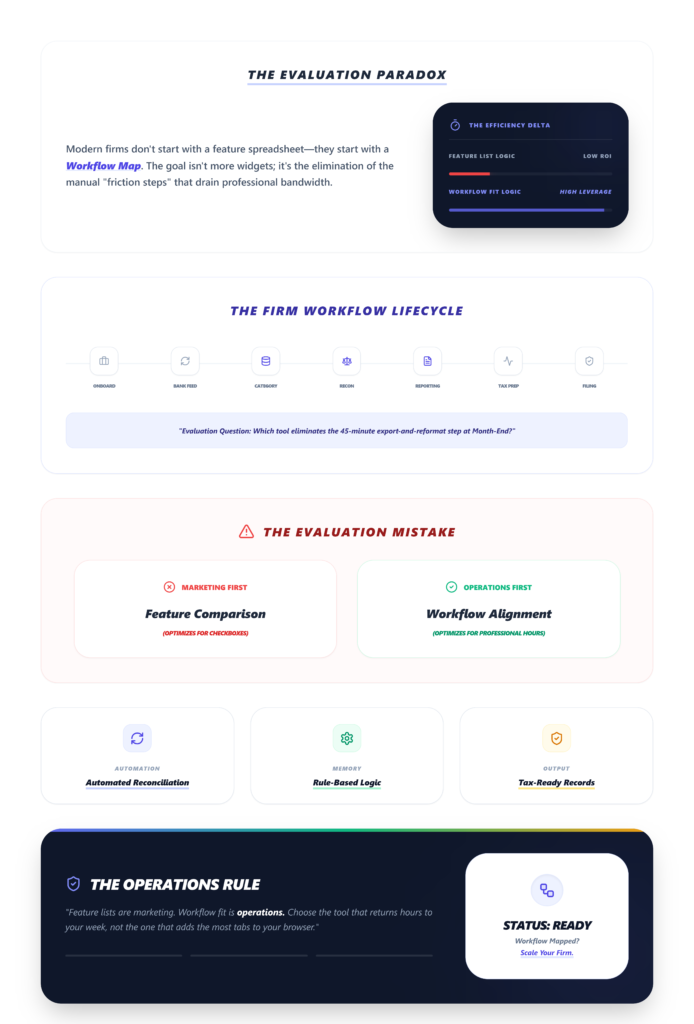
The firms that get this right don’t start with a feature comparison spreadsheet. They start with their workflow.
Map your actual process: client onboarding → bank feed connection → transaction categorization → reconciliation → reporting → tax prep → filing.
Then ask: where does manual work slow us down? Where do errors creep in? Where does the team waste time switching between tools or re-entering data?
That’s your evaluation framework. Not “does it have real-time reporting?” but “does its reporting eliminate the 45-minute export-and-reformat step my team does every month-end?”
The firms that look for tools that save CPA firms time approach the decision this way. Feature lists are marketing. Workflow fit is operations.
Modern bookkeeping platforms like LedgerNext are designed around how accounting firms actually work, combining automated reconciliation, rule-based categorization, and tax-ready outputs to reduce manual effort and improve efficiency.
The Ugly Truth: What Vendors Won’t Show You in the Demo
- Problem: Bank sync drops during tax season
The Weird Fix: Schedule syncs at 2 AM; maintain CSV import as fallback
Context: API rate limits spike during high-volume periods - Problem: Reporting lags after month-end
The Weird Fix: Force-close books nightly via automation rules before dashboard refresh
Context: Uncleared transactions prevent report generation - Problem: E-file compliance flags
The Weird Fix: Manually patch vendor tax table hotfixes; run weekly table audits
Context: Provincial/state tables lag behind legislative changes - Problem: Billable hours don’t sync to invoices
The Weird Fix: Use Zapier bridges as interim; demand native API during demos
Context: CRM-to-billing silos are more common than vendors admit - Problem: Transaction caps hit mid-engagement
The Weird Fix: Split clients across firm sub-accounts; plan ERP migration early
Context: Hidden per-client limits in SMB-tier plans
30–50% of firms abandon their initial software choice due to integration silos they didn’t catch during evaluation. That’s not a typo. Run your tests before you commit.
Checklist: Choosing Bookkeeping Software for Your Firm
- ☐ Supports multi-client management from a single dashboard
- ☐ Automates bank reconciliation with reliable sync
- ☐ Offers rule-based transaction categorization
- ☐ Generates tax-ready reports (T2, GST/HST, 1099)
- ☐ Maintains complete audit trail logs
- ☐ Scales without punitive add-on costs
- ☐ Includes client collaboration portal
- ☐ Provides API integrations for payroll and CRM
FAQ
Which bookkeeping software is best for accounting firms?
There’s no single best option — it depends on your client volume, tax jurisdiction, and workflow complexity. QuickBooks Online dominates US SMB accounting with a 4.2/5 G2 rating, but firms needing multi-entity support often outgrow it. Xero works well for Canadian firms handling GST/HST. For QuickBooks alternatives in Canada, evaluate based on workflow fit, not brand.
How long does it take to implement new bookkeeping software?
Expect 1–3 months for setup, data migration, and team training. Full ROI from automation savings — typically 20–50% time reduction on reconciliations — usually materializes within 6–12 months. ERP-level platforms like NetSuite can take 3–6 months with a 40% abandonment rate if onboarding isn’t well-managed.
How do I fix bank sync failures during tax season?
Schedule syncs during off-peak hours (overnight) and maintain secondary bank feeds or CSV import workflows as backup. Verify API keys quarterly and test connections before peak periods. This is a known issue across platforms, not a defect unique to any one vendor.
What’s the real cost of bookkeeping software for a CPA firm?
Entry pricing is misleading. A $30/month base plan scales to $200+ with payroll integration, multi-entity modules, and advanced reporting add-ons. Budget for the full workflow stack and cap add-on spend at 20% of your base software budget to avoid cost creep.
Scale Your Firm With LedgerNext: The Modern Bookkeeping Platform
If you are looking for a solution that checks every box on that evaluation list, LedgerNext is designed specifically for modern accountants who value precision and speed. Built in partnership with leading CPAs, it is a powerful bookkeeping software that transforms raw bank statements into categorized, tax-ready financial statements automatically.
Instead of fighting with generic tools, LedgerNext is regulation-ready—built specifically for tax codes, GST/HST/QST rules, and provincial compliance. It enables your firm to go from a “shoebox” of receipts to a T2-ready export in three simple steps:
- 1. Upload: Drag and drop client bank statements (PDF, CSV, or scanned PDFs via OCR) directly into the secure, SOC2-compliant portal.
- 2. Categorise: The AI automatically matches transactions and applies your firm’s custom, smart rules (like “Shell = Fuel” across all future statements).
- 3. Done: Review the reconciled data and export it directly to your professional tax software (GIFI ready).
Because it was built for speed, LedgerNext allows you to manage 50+ clients from a single centralized dashboard without the logout/login fatigue. You can clean up messy client data in seconds, filter by vendor, and batch reclassify hundreds of transactions with a single click.
Everything You Need to Serve 2x the Clients
- Efficient Client Management: Modernize your onboarding and ongoing management. Centralize all client data, communication, and documents to reduce administrative overhead by up to 40%.
- A Free, Professional Client Portal: Give your clients a branded portal for secure document exchange, real-time status updates, and mobile-friendly access anywhere, 24/7.
- Custom Rules for Your Staff: Assign specific access levels and permissions to your team. Ensure bank-grade encryption by controlling exactly who can view, edit, or approve files based on their role.
Final Thoughts
Your bookkeeping software should disappear into your workflow. If your team notices it — if they’re fighting it, working around it, or manually fixing what it should automate — that’s your signal.
Pick the tool that fits how your firm actually works. Not the one with the best demo. Not the cheapest one. The one that lets your team do more of the work that matters.
Stop Formatting T2s Manually.
If you’re still reformatting exports and manually categorizing transactions across client files, see what your pipeline looks like when it’s automated end to end.
✅ AI Transaction Categorization
✅ GST/HST/QST Tax-Ready Exports