
It’s 11:47 PM on a Thursday. You’re staring at a bank feed — 1,200 transactions across six clients — and you’re dragging each line item into its category like you’re sorting laundry.
Office supplies. Meals and entertainment. Software subscriptions. Your eyes glaze. You misfile a $4,200 vendor payment under “Miscellaneous.”
You don’t catch it. Nobody catches it until the review, which adds another hour you don’t have.
This is the reality of manual categorization at scale. And if you’ve lived it, you already know the answer to today’s question.
Quick Answer
Which is faster: rule-based or manual categorization?
Rule-based categorization is significantly faster. It automates repetitive transaction tagging using predefined logic, applies consistent rules across every client file, and eliminates the need for line-by-line human input. Manual categorization requires individual attention to each transaction, doesn’t scale, and introduces inconsistency the moment a second bookkeeper touches the file.
When should accountants use rule-based categorization? When your firm handles recurring vendors, high transaction volumes, or multiple client accounts — which is to say, almost always. Manual categorization should be reserved for exceptions, not the default workflow.
Why We’re Comparing These Two Approaches
This isn’t a theoretical debate. For Canadian accounting firms managing 30, 50, or 100+ clients, the categorization method you choose directly impacts your capacity, your margins, and the quality of your tax-ready financials.
Here’s the lens we’re using:
- Speed: How fast can you process a full month of transactions?
- Consistency: Do two bookkeepers categorize the same vendor the same way?
- Scalability: Does this method survive when you onboard five new clients next quarter?
- Error exposure: Where do mistakes creep in — and how expensive are they to fix?
These aren’t abstract criteria. They’re the exact pressure points that determine whether your year-end workflows feel controlled or chaotic.
Manual Categorization: The Familiar Grind
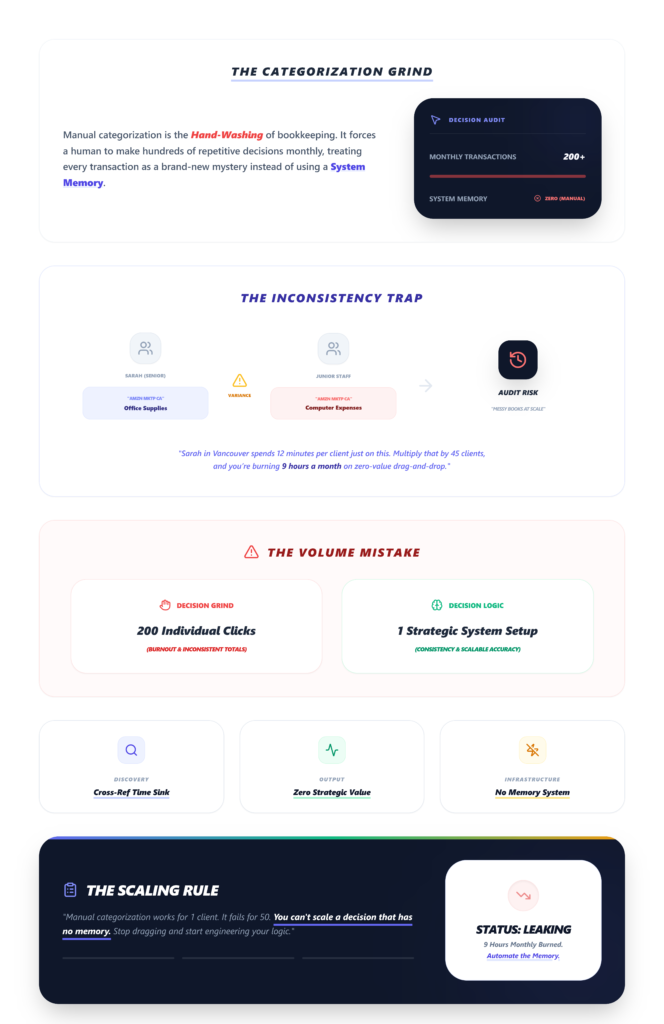
Manual categorization means a human reviews every transaction, selects a category, and moves to the next line. It’s the bookkeeping equivalent of hand-washing every dish in a commercial kitchen.
What it looks like in practice:
You import a CSV or connect a bank feed. Transactions populate. You scroll. You click. You assign. For a client with 200 monthly transactions, that’s 200 individual decisions — some easy, some requiring you to open a browser tab and cross-reference a vendor name you’ve never seen before.
The friction point: There’s no memory. If you categorized “AMZN Mktp CA” as office supplies last month, the system doesn’t remember.
You’re making the same decision again. And if a junior team member handles it next month, they might file it under “Computer and Internet Expenses.” Neither of you is wrong. Both of you are inconsistent.
Mini-scenario: Sarah, a staff bookkeeper at a mid-size firm in Vancouver, spends roughly 12 minutes per client on categorization alone — not including review. Multiply that by 45 clients. That’s nine hours a month just dragging and dropping. Nine hours that produce zero strategic value.
Manual categorization works. It just doesn’t work well when volume enters the picture.
Rule-Based Categorization: Set the Logic, Let It Run
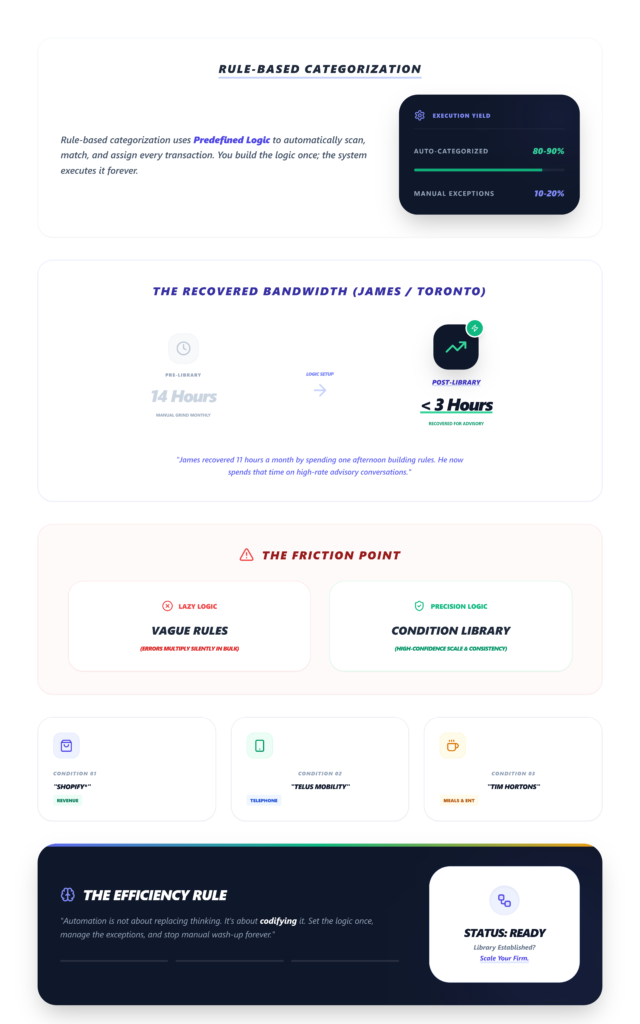
Rule-based categorization uses predefined conditions — vendor name, transaction amount, description keywords — to automatically assign categories. You build the rule once. It fires every time that condition is met.
What it looks like in practice:
You upload transactions. The system scans each line against your rule library. “SHOPIFY*” → Revenue. “TELUS MOBILITY” → Telephone Expense. “TIM HORTONS” → Meals and Entertainment. Within seconds, 80–90% of transactions are categorized.
You review the exceptions — the 10–20% that didn’t match a rule — and you’re done.
The friction point: Initial setup requires thought. You need to define rules carefully, especially for vendors with ambiguous descriptions.
A poorly written rule can miscategorize transactions in bulk — which is worse than a single manual error because it multiplies silently.
Mini-scenario: James runs a firm in Toronto with 60 clients. After spending one afternoon building his rule library, his monthly categorization time dropped from roughly 14 hours to under 3. He now spends that recovered time on advisory conversations his clients actually pay premium rates for.
Key Differences at a Glance
- Speed
Manual Categorization: Slow — every transaction requires a decision
Rule-Based Categorization: Fast — bulk processing in seconds - Consistency
Manual Categorization: Low — varies by person and session
Rule-Based Categorization: High — same rule, same result, every time - Scalability
Manual Categorization: Poor — time grows linearly with clients
Rule-Based Categorization: Strong — rules apply across accounts - Error Rate
Manual Categorization: Higher — fatigue and context-switching
Rule-Based Categorization: Lower — errors are systematic and catchable - Setup Time
Manual Categorization: None
Rule-Based Categorization: Moderate (one-time investment) - Best For
Manual Categorization: Edge cases, new vendors
Rule-Based Categorization: Recurring transactions, multi-client firms
Why Manual Categorization Breaks at Scale
If your firm is handling more than 30–50 clients, manual categorization quickly becomes a bottleneck. Here’s where it fractures:
- Repetitive cognitive load. Your team is making the same categorization decisions hundreds of times per month. That’s not skilled work — it’s pattern recognition that a rule engine handles in milliseconds.
- Inconsistent tagging across team members. One bookkeeper files fuel purchases under “Vehicle Expenses.” Another uses “Travel.” A third creates a new account called “Gas.” Your chart of accounts bloats. Your reports lose integrity. Reconciliation becomes detective work instead of verification. These are the kinds of bank reconciliation errors that cascade into year-end nightmares.
- Increased review time. When categorization is inconsistent, the review layer has to work harder. Your senior accountant isn’t just checking accuracy — they’re interpreting the logic of whoever categorized the file. That’s a hidden cost that doesn’t show up on any timesheet.
- Burnout. Let’s name it. Nobody went into accounting to manually tag 6,000 transactions a month. The tedium erodes job satisfaction, increases turnover, and pushes your best people toward firms that have already automated the mundane.
Why Rule-Based Categorization Is Faster
Speed isn’t just about processing time. It’s about the total cycle — from data import to review-ready financials.
- Bulk processing eliminates per-transaction decisions. Instead of 200 clicks, you get 200 categorized lines with one upload. The cognitive load shifts from “categorize everything” to “verify exceptions.” That’s a fundamentally different — and faster — workflow.
- Consistency removes rework. When every “ROGERS” transaction maps to the same account, your review layer becomes a scan, not an audit. You’re looking for anomalies, not rebuilding logic.
- Reduced human effort compounds over time. Each new rule you create reduces future workload. A firm that’s been building its rule library for six months categorizes faster than one that started last week. The system gets smarter as your firm grows — the opposite of what happens with manual processes.
Rule-based categorization significantly reduces transaction processing time for CPA firms managing multiple clients. That’s not a marketing claim. It’s arithmetic.
Real Workflow Comparison
Manual Categorization Workflow:
- Import data (bank feeds vs CSV statements — each has its own friction)
- Open the transaction list
- Categorize line by line — 200 transactions, 200 decisions
- Flag uncertain items for review
- Senior accountant reviews the entire file
- Correct miscategorizations
- Finalize
Estimated time per client: 15–25 minutes (depending on volume and complexity)
Rule-Based Categorization Workflow:
- Upload or sync transactions
- Rules engine processes all lines automatically
- Review exceptions only (typically 10–20% of transactions)
- Categorize exceptions manually or create new rules
- Senior accountant scans for anomalies
- Finalize
Estimated time per client: 3–7 minutes
That delta — 10 to 18 minutes per client — is where firms recover capacity. Across 50 clients, that’s 8 to 15 hours per month. Across a year, it’s the equivalent of hiring a part-time bookkeeper without the payroll.
When Manual Categorization Still Makes Sense
Rule-based systems aren’t omniscient. There are legitimate scenarios where human judgment is irreplaceable:
- New vendors with ambiguous descriptions. “SQ *JOHN D” could be a contractor payment, a retail purchase, or a client refund. Until you know, a rule can’t help.
- One-off transactions. A client’s annual insurance premium or a rare equipment purchase doesn’t justify building a rule.
- Client-specific exceptions. One client’s “Amazon” purchases are inventory. Another’s are office supplies. The rule needs context that sometimes only a human has.
The smartest firms don’t choose one method — they layer them. Rules handle the 80%. Humans handle the 20%. That’s the workflow that scales without sacrificing accuracy.
How Modern Firms Handle Categorization
The pattern we’re seeing across growing Canadian accounting firms is consistent: automate the predictable, intervene on the exceptions, and build a rule library that compounds in value over time.
Modern bookkeeping platforms like LedgerNext use rule-based categorization to automate repetitive transactions, helping firms save time and maintain consistency across client accounts.
The firms using tools that save CPA firms time aren’t working harder — they’ve just stopped doing the same work twice.
This is especially relevant for firms evaluating QuickBooks alternatives in Canada, where the ability to manage multi-client categorization from a single dashboard changes the operational math entirely.
Comparison Summary
- Rule-Based
Fast, scalable, consistent — the clear winner for firms managing volume - Manual
Slow, limited, necessary only for exceptions and edge cases
The Bottom Line
Manual categorization is the default because it’s familiar, not because it’s effective. Rule-based categorization is faster, more consistent, and scales with your firm instead of against it.
Stop doing the same work twice
The question isn’t whether to switch. It’s how much longer you can afford not to.
If you’re still categorizing transactions one at a time across dozens of clients, you’re not just slower — you’re spending your most expensive resource (human attention) on your lowest-value task. Build the rules. Reclaim the hours. Spend them where they actually move the needle.
FAQs
Can rule-based categorization handle complex chart of accounts structures?
Yes. Most rule engines allow mapping by vendor name, keyword, amount range, and account. The complexity lives in your rule design, not the system’s limitations. Well-structured rules mirror even the most detailed charts of accounts without friction.
What happens when a rule miscategorizes a transaction?
You fix the rule once, and every future transaction follows the correction. That’s the advantage — errors are systematic, which means they’re fixable at the source. Manual errors are random and require individual detection.
Is manual categorization ever more accurate than rule-based?
For novel transactions with no historical pattern, yes. A human reading context clues in a transaction description will outperform a rule that’s never encountered that vendor. But for the 80% of transactions that recur monthly, rules win on both speed and accuracy.
How long does it take to build a useful rule library?
Most firms report that after two to three months of active rule creation, their automation rate exceeds 75%. The upfront investment is real — but it’s a one-time cost that pays dividends every single month after.